Understanding the Procreate Alphabet Stamp Mini Bundle: A Practical Guide for Digital Lettering
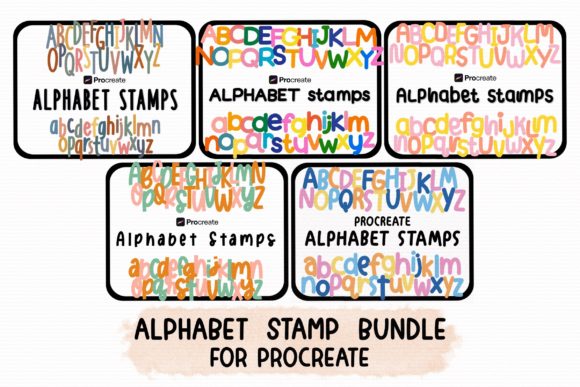
Digital illustration has evolved rapidly, shifting from complex vector-based workflows to intuitive, brush-centric environments. For artists and designers using iPad applications, the demand for efficient typography tools has grown alongside the popularity of hand-lettered aesthetics. The Procreate Alphabet Stamp Mini Bundle represents a specific category of digital assets designed to bridge the gap between custom calligraphy and rapid design execution. This resource offers five distinct sets of handwritten letter stamps, providing uppercase letters, lowercase letters, numbers, and essential punctuation. While these tools offer significant time-saving potential, understanding their specific utility, limitations, and ideal use cases is essential for making an informed decision about integrating them into your creative workflow.
What Defines the Procreate Alphabet Stamp Mini Bundle?
At its core, this bundle is a collection of pre-made digital stamps optimized exclusively for the Procreate application. Unlike standard brushes that require manual stroke execution, stamps allow users to place consistent, pre-designed characters onto the canvas with a single tap. The bundle includes five unique handwriting styles, each containing a complete alphanumeric set: uppercase A-Z, lowercase a-z, and numbers 0-9, along with common punctuation marks such as periods and commas.
The distinction of this product lies in its format and compatibility. It is not a font file that can be installed system-wide on an iPad or computer. Instead, it functions as a specialized brush set within Procreate’s ecosystem. This means the assets are ready to use immediately upon import, requiring no additional software or font management tools. For users who primarily work within Procreate for journaling, social media graphics, or concept art, this seamless integration removes technical friction. However, this specificity also defines its boundaries; the stamps will not function in other illustration apps like Adobe Fresco, Affinity Designer, or Photoshop.
Evaluating Efficiency Versus Customization
When considering digital typography resources, creators often weigh the tradeoff between speed and artistic control. Hand-lettering every character manually offers maximum customization but demands significant time and skill consistency. Using system fonts provides uniformity but often lacks the organic, human touch desired in modern digital art. The Procreate Alphabet Stamp Mini Bundle sits in the middle of this spectrum.
The primary advantage is consistency without repetition fatigue. When creating a series of social media posts or a digital planner layout, maintaining identical letterforms manually can be challenging. Stamps ensure that every "A" looks exactly the same, providing a cohesive visual identity. Furthermore, the inclusion of five different sets allows for stylistic variety. A user might choose a bold, marker-style set for headlines and a thinner, script-like set for body text, all within the same project file.
However, this efficiency comes with limitations. Because the characters are pre-drawn, they lack the dynamic variability of true hand-lettering. Every instance of a letter is identical, which can sometimes appear rigid if overused in large blocks of text. Additionally, while users can resize, rotate, and change the color of the stamps, they cannot alter the fundamental shape of the letterforms without manually editing each stamp layer, which negates the time-saving benefit. Therefore, these tools are best suited for short phrases, titles, logos, or decorative elements rather than long-form paragraphs.
Comparison With Alternative Typography Solutions
To determine if this bundle is the right fit, it is helpful to compare it against other common methods of adding text to digital art.
- System Fonts: Installing custom fonts on an iPad allows for text box usage across multiple applications. This is ideal for editable text and long documents. However, system fonts often feel sterile compared to handwritten styles. The Procreate stamps offer a more authentic, artisanal look but sacrifice editability and cross-app compatibility.
- Manual Hand-Lettering: For high-end bespoke projects, drawing letters by hand remains the gold standard. It allows for perfect kerning, ligatures, and expressive variation. The stamp bundle is a practical alternative for quick turnaround projects where bespoke lettering is unnecessary or budget-constrained.
- Generic Brush Sets: Some artists create their own alphabet brushes. While customizable, building a comprehensive set with proper spacing and punctuation is time-consuming. The Mini Bundle provides a curated, tested solution, saving the upfront investment of creation time.
The decision largely depends on the project scope. If you are designing a logo that requires unique ligatures or specific typographic adjustments, manual lettering or vector software is superior. If you are creating daily Instagram stories, digital journal entries, or quick mockups, the Procreate Alphabet Stamp Mini Bundle offers a balanced compromise between aesthetic quality and production speed.
Technical Considerations and Workflow Integration
Since these assets work only in the Procreate application, users must be comfortable with Procreate’s brush engine. Importing the bundle is straightforward, typically involving a simple file import that adds the stamps to the brush library. Once imported, each letter acts as an individual brush tip. Users select the specific letter brush and tap the canvas to place it.
A critical aspect of using alphabet stamps is managing spacing and alignment. Unlike text boxes, stamps do not auto-align. Users must manually position each character, which requires a keen eye for kerning. Procreate’s drawing guides and snapping features can assist in this process, but it remains a manual task. This hands-on approach allows for creative arrangements, such as arched text or scattered layouts, which are difficult to achieve with standard text tools.
Another technical consideration is resolution. Since these are raster-based stamps, scaling them up significantly beyond their original size may result in pixelation. It is advisable to use them at or near their intended size. For high-resolution print work, users should ensure their canvas DPI is set appropriately before placing the stamps to maintain crisp edges.
Identifying the Ideal Use Cases
Understanding when to utilize this bundle helps maximize its value. The following scenarios represent strong fits for these handwritten alphabet stamps:
- Social Media Content Creation: Influencers and small business owners often need visually appealing text overlays for stories and posts. The handwritten style adds a personal touch that resonates with audiences, and the speed of stamps allows for consistent daily output.
- Digital Planning and Journaling: Users of digital planners appreciate the aesthetic of hand-written headers and labels. The inclusion of numbers and punctuation makes these stamps versatile for dating entries, listing tasks, or annotating diagrams.
- Concept Art and Storyboarding: Artists creating mood boards or storyboards may need quick placeholder text that matches the hand-drawn style of their sketches. These stamps provide a cohesive look without distracting from the visual narrative.
- Educational Materials: Teachers creating digital worksheets or engaging visuals for students can use these friendly, handwritten fonts to make content appear more approachable and less formal.
Conversely, this bundle may not be suitable for corporate branding guidelines that require strict typographic consistency across multiple platforms, or for projects requiring extensive text editing after the initial design phase. In such cases, vector-based typography or system fonts remain more appropriate.
Making an Informed Decision
The Procreate Alphabet Stamp Mini Bundle is a specialized tool designed for a specific workflow. Its value proposition is clear: it offers high-quality, handwritten aesthetics with the efficiency of digital stamping, exclusively within the Procreate environment. For artists who already rely on Procreate as their primary creative tool, this bundle eliminates the need to switch between apps or struggle with font installation issues.
Before purchasing or downloading, consider your typical project requirements. If you frequently create short-form content, value handwritten aesthetics, and prioritize workflow speed, this resource aligns well with your needs. However, if you require cross-platform compatibility, editable text fields, or highly customized letterforms, you may need to explore alternative solutions such as system font installations or manual lettering techniques.
Ultimately, the effectiveness of any digital asset depends on how well it integrates into your existing creative process. By understanding the strengths and limitations of the Procreate Alphabet Stamp Mini Bundle, you can decide whether it serves as a valuable addition to your digital toolkit or if another approach better suits your artistic goals.